
10 UX design mistakes that are killing your website conversions
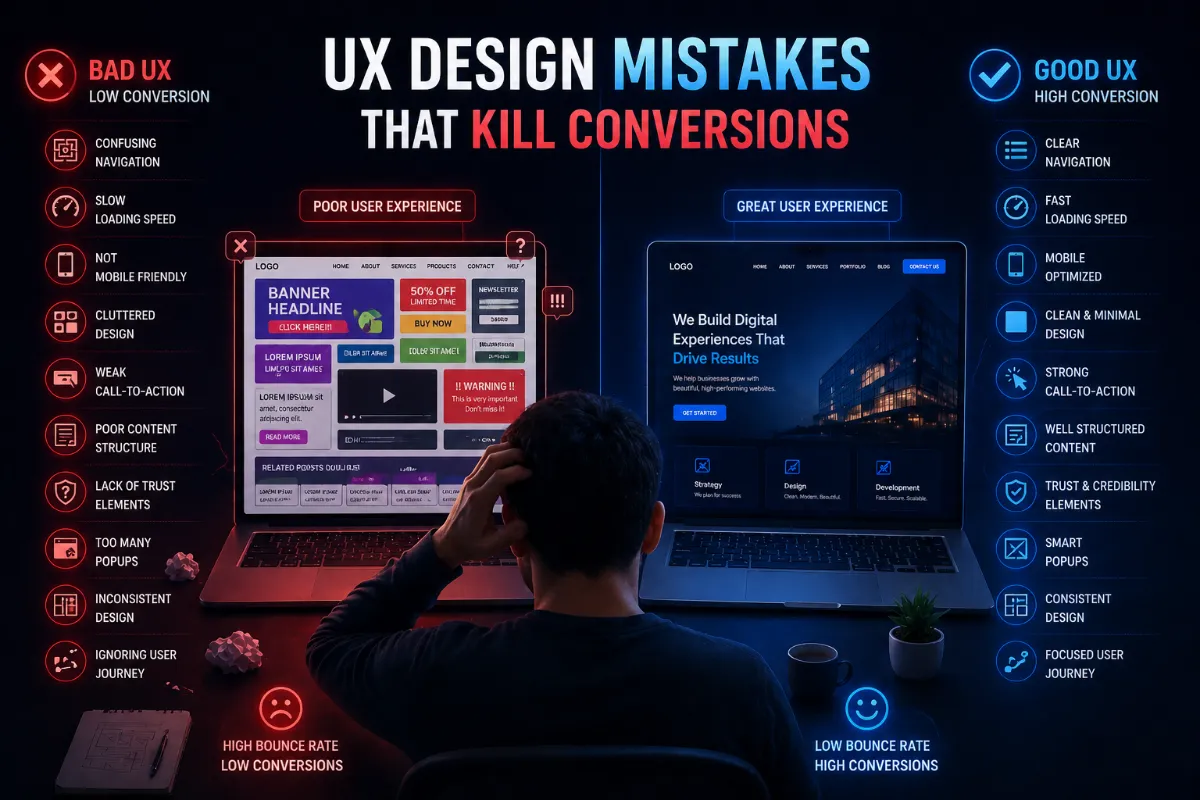
You can drive thousands of visitors to your website, but if your design is poor, those visitors won't convert.
Introduction
You can drive thousands of visitors to your website, but if your design is poor, those visitors won't convert.
That's where UX (User Experience) plays a critical role.
A well-designed website guides users smoothly and helps them take action. But small UX mistakes can silently reduce your conversions without you even realizing it.
In this article, we'll break down 10 common UX design mistakes that are hurting your website performance, and how to fix them.
Why UX matters for conversions
UX design directly impacts:
Even a small improvement in UX can significantly increase your results.
1 confusing navigation
If users can't find what they're looking for quickly, they will leave.
- Too many menu items
- Poor structure
- Hidden important pages
- Keep navigation simple
- Use clear labels
- Organize content logically
2 slow loading speed
Speed is one of the biggest conversion factors.
- Heavy images
- Poor hosting
- Unoptimized code
- Optimize images
- Use fast hosting
- Improve performance
Users leave within seconds if your site is slow
3 not mobile-friendly
Most users access websites on mobile devices.
- Broken layouts
- Hard-to-click buttons
- Poor readability
- Use responsive design
- Optimize for all screen sizes
4 cluttered design
Too much content creates confusion.
- Too many elements
- No clear focus
- Visual overload
- Use white space
- Keep design clean
- Focus on key actions
5 weak call-to-action (cta)
If users don't know what to do, they won't act.
- Hidden buttons
- Unclear CTA text
- Too many CTAs
- Use clear CTAs (e.g., "Hire Us")
- Highlight important actions
6 poor content structure
Even good content can fail if it's hard to read.
- Long paragraphs
- No headings
- Poor formatting
- Use short paragraphs
- Add headings and bullet points
- Improve readability
7 lack of trust elements
Users won't convert if they don't trust your website.
- No testimonials
- No client logos
- No contact details
- Add testimonials
- Show real projects
- Display contact information
8 too many popups
Popups can help, but too many can annoy users.
- Immediate popups
- Repeated interruptions
- Use popups carefully
- Show at the right time
9 inconsistent design
Inconsistent design confuses users.
- Different styles on each page
- Random colors and fonts
- Use a design system
- Maintain consistency
10 ignoring user path
If your website doesn't guide users properly, they won't convert.
- No clear flow
- Missing steps
- Poor page structure
- Design based on user path
- Guide users step by step
Real impact of UX mistakes
These mistakes can lead to:
- High bounce rate
- Low conversions
- Poor user engagement
- Lost business opportunities
Fixing UX can increase conversions by 2x, 5x in many cases
How to improve your website UX
Here are quick improvements:
How Dotdunia technologies can help
At Dotdunia Technologies, we design websites that:
- Focus on user experience
- Improve conversions
- Deliver real results
We combine UX strategy with design and development to create high-performing websites.
Final thoughts
UX is not just design, it's how users experience your website.
Avoiding these mistakes can:
- Improve user satisfaction
- Increase conversions
- Grow your business
Small changes can make a big difference.
Want to Improve Your Website Conversions?
Let Dotdunia Technologies help you create a user-friendly and high-performing website.